Every type in AvaCodeEditor, what problem it solves, and the smallest piece of
code that uses it. Short on purpose — if a paragraph here is not telling you what to type,
it is telling you why you would.
What this is
AvaCodeEditor is one Avalonia control that shows code. You give it text; it draws
the text, a caret and a selection, and lets people type. That is the whole of what it does
by itself.
Everything else — line numbers, folding, blame, breakpoints, diff colours, a right-click
menu — is something you plug in, through small interfaces. The editor never learns
what git is, what a diff is, or what your language means. That is deliberate: it is why
the same control can be a merge tool's pane, a debugger's window and a log viewer without
growing a mode for each.
Fast, because it is arithmetic. Every character sits in one cell of a fixed
grid, so "which character is under this pixel?" is a division, not a search.
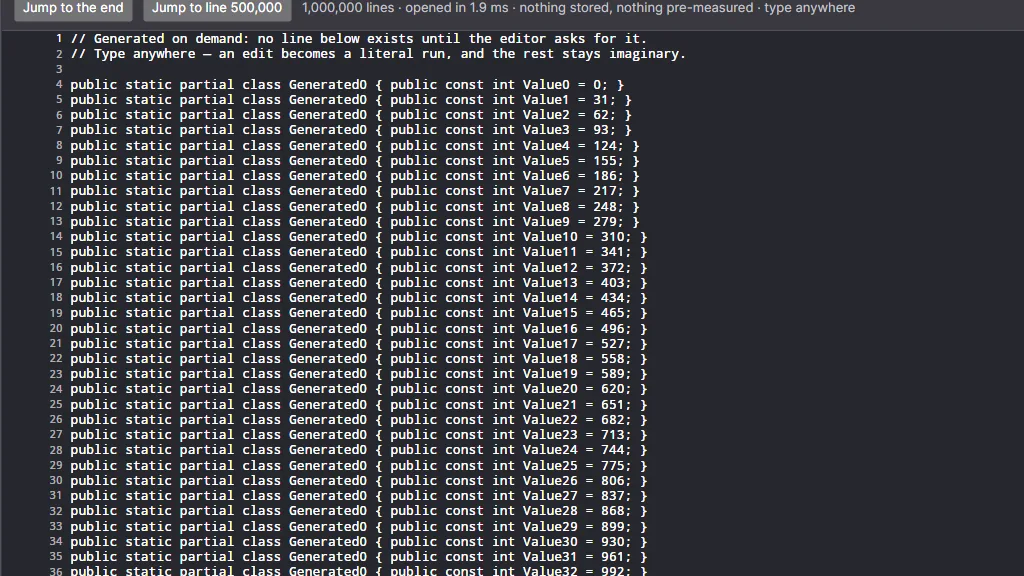
Big files are free. Opening a document reads only the lines about to be drawn —
a million-line file opens in milliseconds.
Nothing to subclass. You implement an interface and hand it over.
Install it
Two packages. The first is the control; the second is highlighting, and is optional —
without it you get plain, uncoloured text.
using AvaCodeEditor.Document;
using AvaCodeEditor.Margins;

Editor.Buffer = new TextBuffer(File.ReadAllText(path));   // the document
Editor.Margins.Add(new LineNumberMargin());               // a gutter of line numbers
Colour is two more lines. The grammar is chosen by file name, the theme by whether your
app is light or dark:
using AvaCodeEditor.Highlighting.TextMate;
using TextMateSharp.Grammars;

var languages = new TextMateLanguageRegistry();
Editor.SyntaxTokenizer = languages.FindByFileName(path)?.CreateTokenizer();
Editor.HighlightTheme = languages.LoadTheme(ThemeName.DarkPlus);
Save the file back with Editor.Buffer.GetText() — it returns
the document with the line endings it was loaded with, mixed ones included.
How it draws
The editor is a canvas with a fixed grid ruled on it. Every character takes exactly
one cell, every cell is the same size, and the gutters you add sit in columns to the left
of the text. Because the grid never varies, the editor answers "where is line 40, column
12?" with multiplication, and "what is under this click?" with division — no searching, no
per-character objects, nothing that gets slower as the file grows.
The control: gutter columns you supply, then the text area, ruled into cells.
Two consequences worth knowing before you write anything:
A character offset is not a column. A tab is one character but eight cells wide.
Ask GridColumns to convert; never assume they are the same number.
A screen row is not a document line. Folding hides lines, and a CodeLens adds a
row that has no line at all. See Rows are not lines.
Who owns what
The shortest way to learn the API is to learn this split. If a question is about
pixels, keys or cells, the editor answers it. If it is about meaning, you do.
The editor does
You do
Draw text, caret, selection
Say what the text is (ITextBuffer)
Measure and hit-test gutters
Draw inside them (IEditorMargin)
Hide folded lines, keep the caret sane
Say where regions are (IFoldingProvider)
Draw and click lens rows
Say what they say (ICodeLensProvider)
Reserve the blame column, show tooltips
Supply the blame (ILineAnnotationProvider)
Render and hit-test block buttons
Say what they do (IChangeActionProvider)
Paint bands under the glyphs
Pick the colours (ILineBackgroundProvider)
Tell you the word, scope and cell
Decide what the popover shows
Keep tokens current as you type
Supply the grammar and theme
The document
A document is a list of lines. The editor reads only the lines it is about to draw, so
the interface is small on purpose — three interfaces, in fact, stacked by how much power
you want to hand over.
ITextBuffer AvaCodeEditor.Document
Solves: letting the editor show a document without owning it —
or reading it all. Line access must be O(1), because the renderer asks for the sixty
lines on screen every frame and nothing else.
Member
What it is
int LineCount
How many lines. Must be cheap — it is asked constantly.
string GetLine(int)
One line, without its terminator.
LineTerminator GetLineTerminator(int)
Lf, CrLf, Cr or None — kept per line so mixed files round-trip.
int Version
Bumped on every change; the editor uses it to know its caches are stale.
event Changed
Raised with a TextChange — which lines went, which arrived.
IEditableTextBuffer adds ReplaceLines (and
ReplaceLinesExact, which preserves terminators verbatim). IUndoableTextBuffer
adds Undo, Redo and BeginUndoGroup. They are separate
so a read-only viewer cannot be written to by accident, and so a host that keeps its own
history can refuse to hand undo to the control.
// A viewer that cannot be edited, whatever a key handler tries:
Editor.Buffer = new ReadOnlyLog(path);   // implements ITextBuffer only
Editor.IsReadOnly = true;                // and say so, so navigation still works
TextBuffer AvaCodeEditor.Document
Solves: the ordinary case — a file in memory that can be edited
and undone. Use it unless your document is enormous or lives somewhere else.
var buffer = new TextBuffer(File.ReadAllText(path));
Editor.Buffer = buffer;

buffer.ReplaceLines(10, 2, ["one new line"]);   // lines 10–11 become one line
string all = buffer.GetText();                  // original line endings preserved
File.WriteAllText(path, all);
Member
What it is
TextBuffer(string text = "")
Splits text into lines, remembering each terminator.
string GetText()
The whole document back, byte-for-byte in its endings.
LineTerminator PredominantTerminator
What new lines get: the most common ending in the file.
void ReplaceLines(int start, int count, IReadOnlyList<string>)
The one mutation. Everything else is built on it.
void ReplaceLinesExact(…)
The same, with terminators you choose — for undo and for hosts that must preserve endings exactly.
bool Undo() / Redo()
One step back or forward. False when there is nothing.
IDisposable BeginUndoGroup(string label)
Everything inside the scope becomes one undo step.
int UndoDepth / RedoDepth
How many steps are available — for a host reconciling its own menu.
int UndoLimit / long UndoLineBudget
Caps on history: by step count, and by total snapshotted lines, because one step can hold a whole document.
string? UndoLabel / RedoLabel
Text for an "Undo rename" menu item.
void ClearHistory()
After loading a different file into the same buffer.
events Changed, EditRecorded, UndoStateChanged
Content changed; a new edit was recorded (never during undo); undo availability changed.
Solves: saying where something is, unambiguously.
TextPosition is a line plus a character offset into that line's text —
not a visual column, because a tab is one character and eight cells.
var at = new TextPosition(line: 12, character: 4);
Editor.Selection = new TextSelection(at, at with { Character = 20 });  // anchor … caret
Editor.MoveCaret(at, extend: false);
Editor.BringCaretIntoView();
Member
What it is
TextPosition(int Line, int Character)
Comparable and ordered, so a < b means "earlier in the document".
Where the selection started, and where it is being dragged to.
Start / End
The two ends in document order, whichever way it was dragged.
IsEmpty
True when it is just a caret.
WithCaret(position)
Extend the selection: the anchor stays where the user put it.
The anchor is kept rather than a tidy start/end pair on purpose. Normalising
on the way in loses which end the user is dragging, and shift+arrow then jumps.
Undo, and grouping it AvaCodeEditor.Document
Solves: one user action that touches many lines being undone in
one press, not fifteen.
using (buffer.BeginUndoGroup("Take left side"))
{
    foreach (var chunk in chunks)
        buffer.ReplaceLines(chunk.Start, chunk.Length, chunk.Replacement);
}   // one step in the history, labelled for the menu
If your application owns a wider history — a merge tool coordinating two documents —
turn the control's own handling off and route the keystrokes to your command instead:
Editor.IsUndoEnabled = false; // Ctrl/Cmd+Z now reaches your host, and one history stays authoritative
A buffer of your own for very large or virtual documents
Solves: documents that do not fit in memory, or do not exist yet —
a million-line log, a generated file, a database cursor. Implement
ITextBuffer and compose each line when the editor asks for it.
sealed class Generated : ITextBuffer
{
    public int LineCount => 1_000_000;
    public int Version => 1;
    public string GetLine(int i) => $"line {i:N0} — composed just now, stored nowhere";
    public LineTerminator GetLineTerminator(int i) => LineTerminator.Lf;
    public event EventHandler<TextChangedEventArgs>? Changed { add { } remove { } }
}
Nothing else changes: the gutters, the highlighting and the scrollbar all work, because
none of them was ever allowed to ask a question about the whole document. The demo's
A million lines scenario is exactly this, plus edits held as runs spliced into an index.
A million lines, opened in 4 ms: the editor read the sixty it had to draw.
The control
CodeEditor is an ordinary Avalonia Control. Everything below is
a styled property, so it binds, animates and inherits like any other.
CodeEditor AvaCodeEditor
Property
What it does
ITextBuffer? Buffer
The document. Set it and the editor redraws; set a new one and it starts again.
FontFamily / double FontSize
The typeface. It is measured, never assumed — a proportional fallback still gives a consistent grid.
IBrush? Foreground / Background
Ink and ground when no theme says otherwise.
int TabSize
Cells per tab stop. Default 4.
bool IsReadOnly
Blocks every mutation, keeps navigation, selection and copy. What a viewer pane wants.
bool IsUndoEnabled
Whether the control answers Ctrl/Cmd+Z itself. Turn off when your app owns the history.
bool CaretBlink
Off makes rendering deterministic — useful in tests and screenshots.
ILineTokenizer? SyntaxTokenizer
The language. Null means plain text.
IHighlightTheme? HighlightTheme
Scope → colour. Swapping it repaints without re-tokenizing a line.
IFoldingProvider? Folding
Where collapsible regions are. Null means nothing folds.
ICodeLensProvider? CodeLens
The rows of information above declarations.
ILineBackgroundProvider? LineBackgrounds
A brush behind whole lines — diff bands, the current statement.
ISegmentBackgroundProvider? SegmentBackgrounds
Brushes behind runs of characters inside a line.
IList<IEditorMargin> Margins
The gutter columns, left to right. Add and remove at any time.
event MarginFailed
A gutter threw and was skipped. Raised once per fault, not once per frame.
double TextOrigin
Where the text starts: the total width of the gutters.
Caret and selection
Solves: driving the editor from your own commands — Go To Line,
Find, "jump to this stack frame" — without knowing anything about pixels.
Editor.MoveCaret(new TextPosition(120, 0), extend: false);
Editor.BringCaretIntoView();                       // scrolls the least it can

Editor.Selection = new TextSelection(start, end);  // clamped onto real character boundaries
string picked = Editor.SelectedText;               // "" when it is only a caret
Editor.SelectionChanged += (_, _) => status.Text = $"{Editor.CaretPosition}";
Member
What it does
TextSelection Selection
Get or set. Setting clamps into the document and onto cluster boundaries — a caret is never left inside an emoji.
TextPosition CaretPosition
The moving end: where typing goes.
string SelectedText
The selection as text; with several carets, every one of them, top to bottom.
void MoveCaret(TextPosition, bool extend)
Move, extending the selection instead of collapsing it when asked.
void SelectAll()
What it says.
void BringCaretIntoView()
Scrolls the minimum that puts the caret's cell fully on screen.
TextPosition PositionAt(Point)
The document position under a point in control coordinates.
Rect CaretRect / GetCellRect(TextPosition)
Where the caret is; where any cell is — for your own overlays, squiggles and popovers.
event SelectionChanged
Raised whenever the caret or the selected region changes.
Editing from code
Solves: your commands making the same edits the keyboard makes —
with the same undo behaviour and the same caret rules.
if (Editor.CanEdit)                 // false when read-only, or the buffer is not editable
{
    Editor.InsertText("TODO: ");    // replaces the selection, like typing does
    Editor.Backspace(wholeWord: true);
    Editor.Undo();
}
Editor.Copy(); Editor.Cut(); Editor.Paste();
For edits addressed by position rather than by caret, the same rules live in two static
classes you can call directly — both are pure functions over a buffer, which is why they
are testable without a window:
Helper
What it is for
DocumentEditor.Replace / Insert / Delete
Character-level edits on a line-based buffer; returns where the caret ends up.
DocumentEditor.GetText(buffer, start, end)
Text between two positions, carrying the document's own line endings.
CaretNavigation.Left / Right / Vertical / WordLeft / WordRight
Where a key would take the caret. Grapheme clusters, not chars.
Character offset ⇄ grid column, with tabs expanded. The conversion you must not do by hand.
Keyboard and mouse
Solves: people already knowing how to use it. The bindings are the
ones every code editor has, and they follow the platform: Cmd is the command key
on macOS, Ctrl everywhere else.
Gesture
Does
Arrows
Move by one cluster or line. With Shift, extend the selection.
Ctrl+arrow · Alt+arrow (macOS)
Move by word.
Home / End
Smart Home (first non-whitespace, then column 0) and end of line.
Ctrl+Home / Ctrl+End · Cmd+↑ / Cmd+↓
Start and end of the document.
Cmd+← / Cmd+→ (macOS)
Start and end of the line.
PageUp / PageDown
By one screen of rows — over a folded region in one step.
Shift+Alt+arrow · Shift+Alt+Cmd+arrow (macOS)
Open a rectangular selection from the keyboard.
Esc
Close the popover; else drop the extra carets; else collapse the selection.
Backspace / Delete
The selection, else one cluster. With the word modifier, the whole word.
Tab
Inserts a tab — it is a character in a code document, not focus movement.
Ctrl/Cmd+A · C · X · V
Select all, copy, cut, paste.
Ctrl/Cmd+Z · Shift+Ctrl/Cmd+Z · Ctrl+Y
Undo and redo (Ctrl+Y off macOS), unless IsUndoEnabled is false.
Menu key · Shift+F10
Ask for a popover at the caret.
Click · double · triple
Caret · select the word · select the line. Drag continues in that unit.
Alt+drag
A rectangle, and a caret on every line of it.
Ctrl/Cmd+Alt+click
Add one more caret, keeping the ones already there.
Right-click
Raises PopoverRequested for whatever is under the pointer.
Metrics and scrolling
Solves: anything you draw beside the editor needing the same
geometry it uses — a minimap, a scrollbar of your own, an overlay.
Member
What it is
EditorMetrics Metrics
The measured cell: CharWidth, LineHeight, Baseline, plus XForColumn, YForLine, ColumnAtX, LineAtY.
EditorViewport TextViewport
The slice on screen: first visible line, how many, horizontal offset.
Size Extent / Vector Offset / Size Viewport
Standard ILogicalScrollable: put the control in a ScrollViewer and it scrolls by lines.
double TextOrigin
Total gutter width — where cell 0 begins.
Extent's width is what has been seen, not what exists. Finding the
widest line of a file means reading every line of it, and an editor that did that on open
would not open a million-line file at all. The width grows as lines come on screen.
Gutters
A gutter — the editor calls it a margin — is a vertical strip beside the text.
Line numbers are one. So are folding chevrons, blame, breakpoints, and the ≫ buttons of a
merge tool. The editor owns none of them: it lays them out left to right, hands each one a
rectangle and the facts about the frame, and asks it to draw.
Margins scroll vertically with the text and stay pinned horizontally — a line
number that slides off the left edge on a long line is worse than no line number at all.
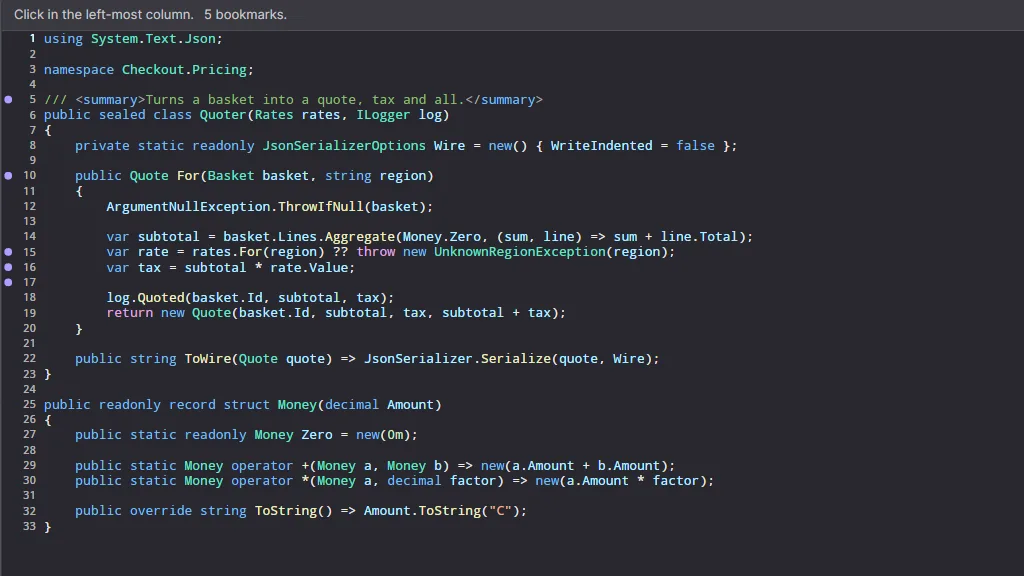
Two gutters: a bookmark column of forty lines, then the line numbers.
IEditorMargin AvaCodeEditor.Margins
Solves: adding a column to the editor without changing the editor.
You implement three things — how wide, what to draw, what a click means — and the editor
does the rest.
Member
What you write
double GetWidth(EditorMetrics, ITextBuffer?)
How wide the column is. Arithmetic, not measurement — this runs on every layout, and a width that follows what is on screen slides the code sideways as you scroll.
void Render(DrawingContext, in MarginContext)
Draw. Runs every frame for every visible row, so it must be a lookup, never a search.
bool OnPointerPressed(Point, in MarginContext)
True if you consumed it — which also makes you the owner of the whole gesture: every move and the release come to you, wherever they land.
void OnPointerMoved(Point, in MarginContext)
Optional. Hover, or a drag you own.
bool OnPointerReleased(Point, in MarginContext)
Optional. A destructive button acts here, and only if the release landed on the same thing the press did — pressing and sliding off is a cancel, in every toolkit there is.
void OnPointerExited()
Drop hover and any held press: no release is coming.
string? GetTooltip(Point, in MarginContext)
Text for what is under the pointer. The editor shows it on itself.
event Changed
"My content or width changed." May be raised from any thread; the editor marshals.
MarginContext AvaCodeEditor.Margins
Solves: a margin needing the whole truth about this frame in one
value — the document, the viewport, the theme, the grid — instead of reaching back into
the control.
Member
What it gives you
Buffer, Metrics, Viewport, Bounds
The document, the cell size, the visible slice, your own rectangle.
Foreground, IsDark
The host's ink, and which way the theme is pointing.
Caret
Where the caret is — for emphasising the line it is on.
double YOf(int line)
The top of a line, in your coordinates. Far off-screen for a line inside a fold, so a naive loop under-draws instead of stacking glyphs.
int LineAt(double y)
The line under a y, or −1. A click beside a lens row belongs to the line it describes.
VisibleLines
Iterate this, not a numeric range: it steps over what a collapsed region hides, and allocates nothing.
bool IsHidden(int line)
True when the line is folded away.
GutterText(double scale)
Font size, per-cell advance and baseline for drawing text a notch smaller than the code, on the code's own grid.
The four built in
Solves: the gutters everyone needs, so you only write the ones
nobody else has.
Sized from the digit count, so it never jitters as you scroll. SelectsLineOnClick, FirstLineNumber, LineClicked.
FoldingMargin
▾ / ▸ beside foldable lines
Set View = Editor.FoldingState. Acts on the press: folding is instantly reversible, so the cancel rule a rewrite button needs would only make it feel slow.
LineAnnotationMargin
Blame, or any per-line label
Width is declared by the provider, not measured, so text never shifts sideways. Runs of like lines are labelled once; CollapseRepeats turns that off. Empty provider ⇒ zero width.
ChangeActionMargin
Buttons anchored to blocks (≫ / ≪)
Acts on release, and only where the press began. ButtonFace, ButtonHover, ButtonPressed, ButtonForeground if the derived colours are not yours.
Write your own
Solves: the column only your application knows about — bookmarks,
coverage, lint counts, a merge decision. Here is a whole gutter: it reserves a width,
draws a dot on the lines in a set, and toggles one on a click.
sealed class BookmarkMargin : IEditorMargin
{
    private readonly HashSet<int> _lines = [];

    public event EventHandler? Changed;

    // Arithmetic over the grid — never a measurement.
    public double GetWidth(EditorMetrics metrics, ITextBuffer? buffer) =>
        Math.Max(12, metrics.CharWidth * 1.6);

    public void Render(DrawingContext drawing, in MarginContext context)
    {
        var brush = new SolidColorBrush(context.IsDark ? Colors.MediumPurple : Colors.RebeccaPurple);
        double radius = Math.Min(4, context.Metrics.LineHeight / 4);
        double centre = context.Bounds.Width / 2;

        // Only the rows on screen, and only the marked ones: the set is the state,
        // the frame is a reading of it.
        foreach (int line in context.VisibleLines)
        {
            if (!_lines.Contains(line))
                continue;

            double y = context.YOf(line) + (context.Metrics.LineHeight / 2);
            drawing.DrawEllipse(brush, null, new Point(centre, y), radius, radius);
        }
    }

    public bool OnPointerPressed(Point position, in MarginContext context)
    {
        int line = context.LineAt(position.Y);
        if (line < 0)
            return false;

        if (!_lines.Remove(line))
            _lines.Add(line);

        Changed?.Invoke(this, EventArgs.Empty);
        return true;
    }

    public string? GetTooltip(Point position, in MarginContext context) =>
        _lines.Contains(context.LineAt(position.Y)) ? "Bookmarked" : null;
}
Then Editor.Margins.Add(new BookmarkMargin()); and it is a column of the
editor. Two rules to keep:
Consume a press only when you did something with it. A margin that returns
true and does nothing is a dead strip that swallows clicks — and, because consuming a
press makes you the owner of the gesture, drags as well.
Marks are line numbers, and lines move. Subscribe to the buffer's
Changed and shift your set by the TextChange, or your
bookmarks will drift as the document is edited.
When one throws MarginFailedEventArgs
Solves: a bug in your gutter not costing somebody their
unsaved document. A margin runs inside the render pass; the editor catches it, drops that
column for the frame, and tells you once — not sixty times a second.
Editor.MarginFailed += (_, e) =>
{
    status.Text = $"The {e.Margin.GetType().Name} column stopped: {e.Error.Message}";
    Editor.Margins.Remove(e.Margin);   // safe here: the event arrives after the frame, not inside it
};
Nothing in the editor is broken when this fires. The caret, the text and the document
are exactly as they were.
Solves: a blame column — per-line metadata that arrives late, from
somewhere slow, and must not push the code sideways when it does.
You declare how wide the column may be in characters; the editor reserves that and never
re-measures. Return null while the data is still loading, then raise
AnnotationsChanged when it lands — from any thread; the editor marshals.
sealed class Blame : ILineAnnotationProvider
{
    public event EventHandler? AnnotationsChanged;

    public int MaxCharacters => 30;                   // declared, not measured

    public LineAnnotation? GetAnnotation(int line)
    {
        if (!_loaded)
            return null;                              // nothing yet, and the column takes no width

        var commit = _commits[line];
        return new LineAnnotation($"{commit.Short} {commit.Author}", Tooltip: commit.Message);
    }

    public void Arrived() { _loaded = true; AnnotationsChanged?.Invoke(this, EventArgs.Empty); }
}

Editor.Margins.Add(new LineAnnotationMargin { Provider = new Blame() });
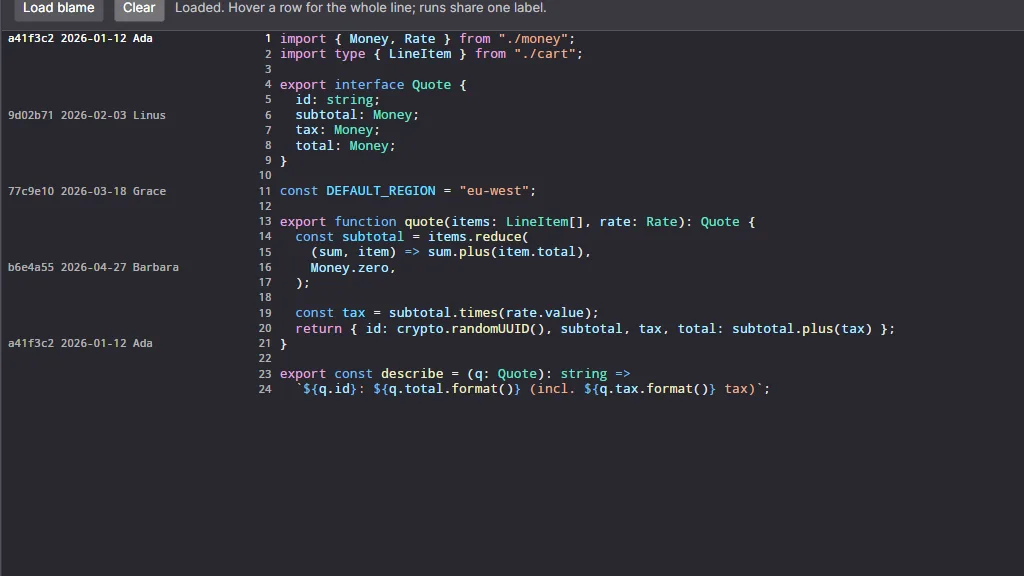
Consecutive lines whose annotation text is equal are labelled once, at the top of
the run — otherwise one commit repeats down two hundred identical rows. Every line still
answers with the full text in its tooltip, including the ones with no label drawn.
One label per run of like lines; hovering any row shows the whole of it.
Solves: buttons that belong to a block of lines and rewrite
it — the ≫ / ≪ of a merge tool, "apply this fix", "accept this suggestion".
sealed class Merge : IChangeActionProvider
{
    public event EventHandler? Changed;

    public int MaxActionsPerLine => 1;

    public IReadOnlyList<ChangeAction> GetActions(int line) =>
        _chunkByLine.TryGetValue(line, out var chunk)
            ? [new ChangeAction($"take-left-{chunk.Id}", "≫", "Take the left side", () => Take(chunk))]
            : [];
}

Editor.Margins.Add(new ChangeActionMargin { Provider = new Merge() });
Member
What it is
ChangeAction(Id, Glyph, Tooltip, Execute)
The Id names the action and the thing it acts on — "take-left-chunk-7", not "take-left" — because the button is drawn once for a whole block of lines and the editor tells them apart by id.
GetActions(line)
What is anchored at this line. Return the same action object for every line of the block.
MaxActionsPerLine
How many the column must have room for. Reserved width, again, rather than measured.
Execute
Runs on the UI thread, on release, and only if the release landed on the same button as the press. The editor neither knows nor cares what it does.
The buttons live in a column of their own — not inside the text, where a caret
would have to fight them for the same clicks.
Structure
Two features share one idea: what is on screen is not the document. Folding takes
rows away; a CodeLens adds one. The editor keeps the map between them, so your gutters,
the caret and every click stay correct without knowing either feature exists.
Solves: collapsing a block without the editor knowing what a block
is. It asks you one question, about one line, and only for lines it is drawing — so a
million-line file costs nothing.
sealed class BraceFolding : IFoldingProvider
{
    // Built once from the document, and again when it changes — never per frame.
    private readonly Dictionary<int, FoldRegion> _regions = ScanBraces(buffer);

    public event EventHandler? Changed;

    // "Does a region start on this line?" — nothing else is ever asked.
    public FoldRegion? GetRegion(int line) =>
        _regions.TryGetValue(line, out var region) ? region : null;
}

Editor.Folding = new BraceFolding(buffer);
Editor.Margins.Add(new FoldingMargin { View = Editor.FoldingState });
Member
What it is
FoldRegion(int Header, int Last, string? Placeholder)
The header line stays visible; everything after it up to Last hides. The placeholder is what is drawn after the header's text — "⋯ 12 lines ⋯" if you say nothing.
bool HidesAnything
False for a one-liner. Such a region is ignored.
FoldRegion? GetRegion(int line)
Your answer. Guarded by the editor: if it throws, that line loses its chevron — never the frame.
event Changed
Re-parsed, so the chevrons should be re-asked.
The editor remembers which regions are closed — that survives a re-parse, and is nothing
a provider should have to store:
Solves: putting a clickable line of information above a declaration
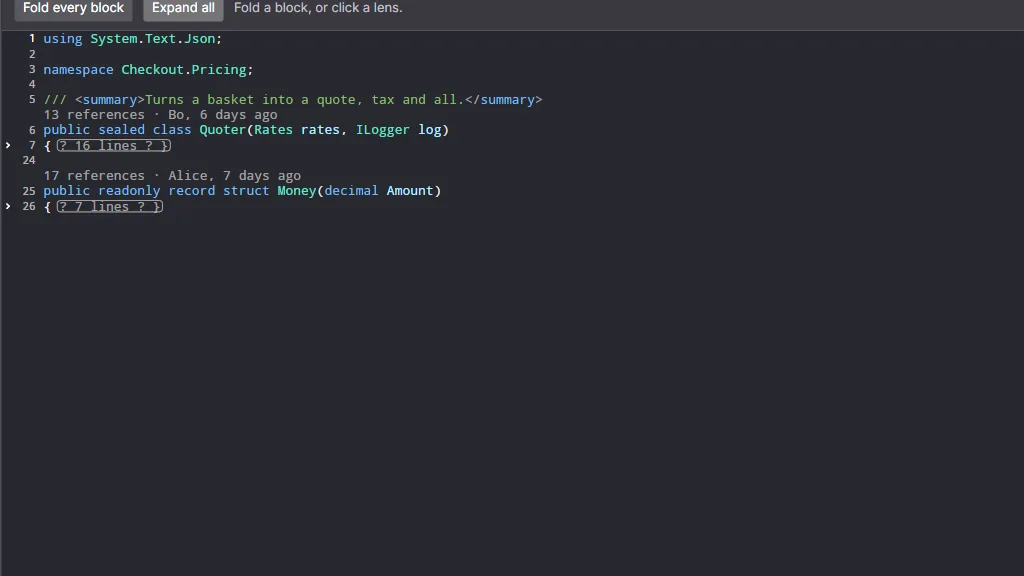
— "15 references · Bo, 6 days ago · 2 tests passing" — without the editor learning what a
reference is.
You give two things: which lines carry a lens, and what each one says.
The anchors are a list you hand over, precisely because the editor may not ask a million
lines whether they have a lens.
sealed class Lenses : ICodeLensProvider
{
    public event EventHandler? Changed;

    public IReadOnlyList<int> AnchorLines => _declarations;      // the lines with a row above them

    public IReadOnlyList<CodeLensItem>? GetLens(int line) =>
    [
        new CodeLensItem("15 references", "Everything that calls this", () => ShowResults(line)),
        new CodeLensItem("Bo, 6 days ago", "Last commit that touched it"),   // no action: a label
    ];
}

Editor.CodeLens = new Lenses();
A lens row occupies exactly one row of the character grid, so nothing about the geometry
changes. Items are clicked on release, and only where the press began.
Both at once: regions folded into their first line, lens rows above declarations.
Rows are not lines AvaCodeEditor.Rendering.LineLayout
Solves: the bug every editor with folding has had — a gutter that
draws line n at row n, and paints fifty glyphs on top of a folded header.
Everything that turns a y into a line, or a line into a y, goes through one map.
One region collapsed, one lens added: nine lines become six rows.
You rarely touch LineLayout directly — MarginContext already
speaks in it. It matters when you write a gutter: iterate
context.VisibleLines and use context.YOf(line), and folding
costs you nothing. With nothing folded and no lens the map is the identity, row
n is line n, and it costs one object.
Member
What it answers
RowAt(row)
What this row shows: RowKind.Text plus a line, or RowKind.Lens.
RowOfLine(line)
Which row draws a line. A hidden line answers with its header's row — the one place on screen that stands for it.
LensRowOfLine(line)
The lens row above a line, or −1.
IsHidden(line)
Inside a collapsed region.
LineByRowOffset(line, rows)
What an arrow key means: a collapsed region is one step, not the fifty lines it hides.
FirstVisibleAtOrAfter(line)
Where a caret goes when it lands inside a fold.
Colour behind text
Two providers paint under the glyphs. One colours whole lines, the other colours runs of
characters inside a line. Both are asked per visible line, on every frame, so both must be
lookups into something you prepared earlier.
ILineBackgroundProvider AvaCodeEditor.Decorations
Solves: the band behind a line — added, removed and conflicting
lines in a diff; the statement a debugger is about to run; the row a search landed on.
sealed class Bands : ILineBackgroundProvider
{
    public event EventHandler? Changed;

    public IBrush? GetLineBackground(int line) =>
        _added.Contains(line)   ? Green
      : _removed.Contains(line) ? Red
      : null;                                  // null means "no band"
}

Editor.LineBackgrounds = new Bands();
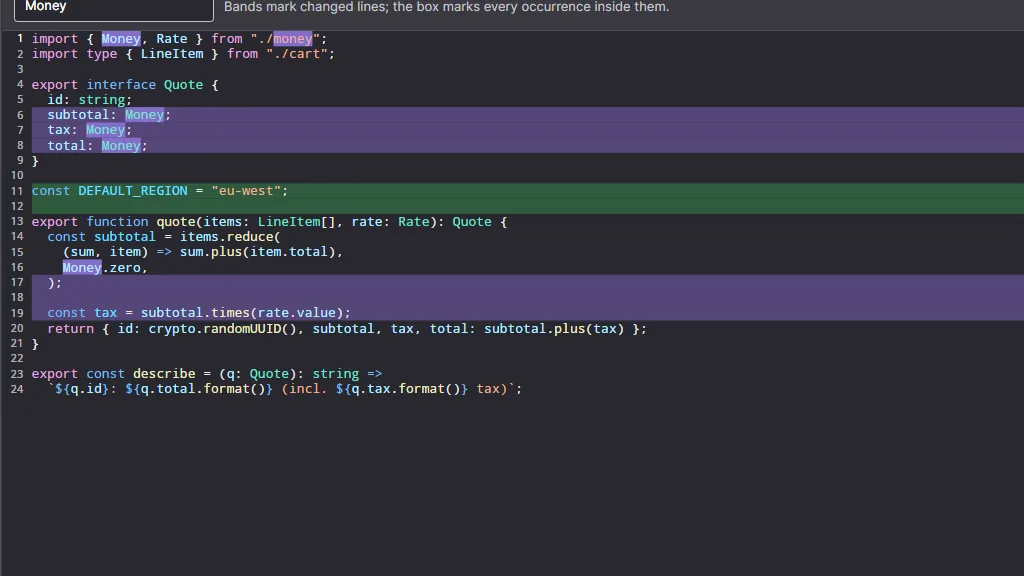
Solves: saying which part of a changed line changed — word
level diff, every occurrence of a search term, a spelling range.
public IReadOnlyList<TextSegment> GetLineSegments(int line) => _hits[line];

// Start and Length are CHARACTER offsets, never visual columns — the editor owns the grid
// and does the conversion, because a tab is one character and several cells.
new TextSegment(Start: 12, Length: 5, Brush: highlight)
Set both and you get both: the band paints first, the runs paint over it.
Bands mark the changed lines; the segments mark what changed in them.
Many carets
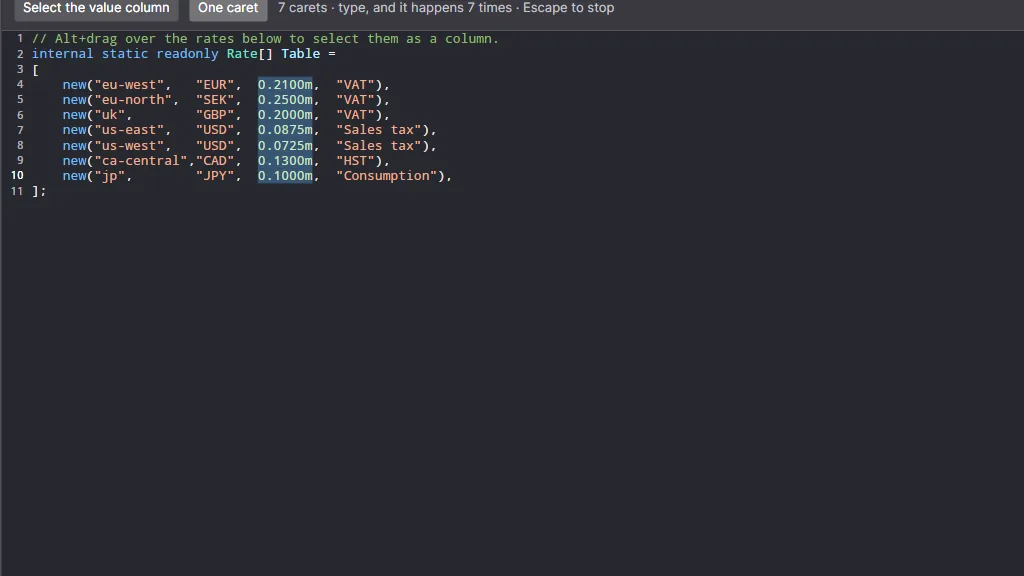
Alt+drag a rectangle over a column of numbers and every line of it gets a caret. What you
type next is typed at all of them, as one undo step, and copying gives you the
column rather than a smear of whole lines.
Seven carets: type once, and it happens seven times.
ColumnSelection AvaCodeEditor
Solves: a rectangle being a rectangle. A box is a run of visual
columns over a run of lines — so it can extend past the end of a short line, which
an ordinary selection cannot. Each line's own character offsets are worked out from its
own text when the box becomes carets.
// Exactly what Alt+drag does, from code: lines 4–10, cells 29–36.
Editor.SetBoxSelection(new ColumnSelection(3, 29, 9, 36));

Editor.AddCaret(new TextPosition(12, 4));   // one more, keeping the rest — Ctrl/Cmd+Alt+click
Editor.CollapseToPrimaryCaret();            // back to one — Escape
The box, with FirstLine, LastLine, LeftColumn, RightColumn for the tidy version.
ColumnSelection? BoxSelection
The rectangle in force, or null.
IReadOnlyList<TextSelection> AdditionalSelections
Every caret past the first, in document order.
bool HasMultipleCarets
True while there is more than one.
bool AddCaret(TextPosition)
Add one. False if a caret is already there.
bool CollapseToPrimaryCaret()
Back to one caret. True if there was more than one.
Popovers
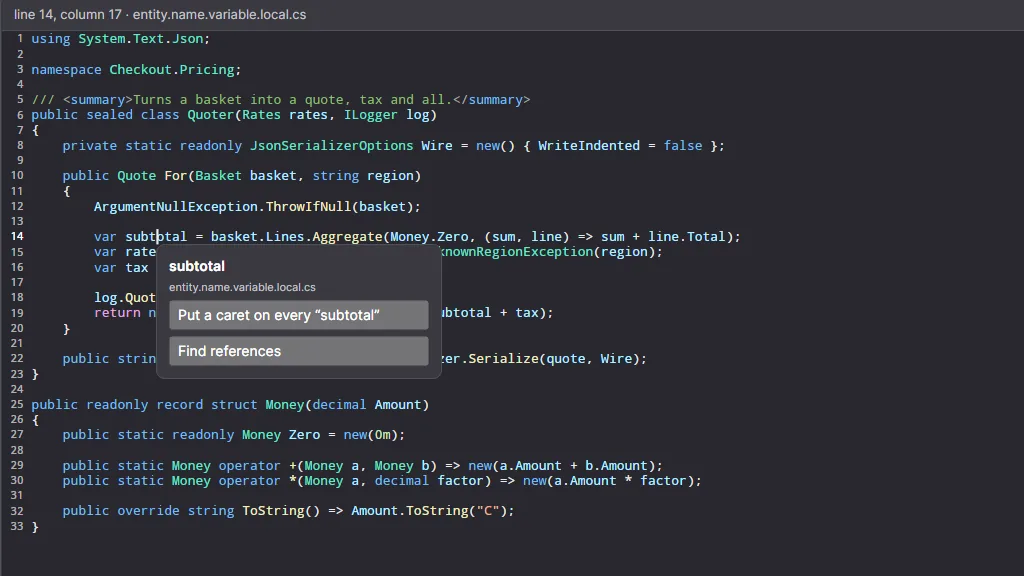
Right-click, and the editor tells you everything it knows about that spot, then shows
whatever control you hand back — anchored to the character cell under the pointer. It never
decides what a menu should say, because that is a question about your application.
PopoverRequested AvaCodeEditor
Solves: a context menu that knows where it is — without you
re-deriving the word, the selection or the syntax under the pointer, and without the
control learning what a symbol is.
Editor.PopoverRequested += (_, e) =>
{
    // e.Scopes is the TextMate scope chain: "am I in a string, a comment, a type name?"
    bool inComment = e.Scopes.Any(s => s.Contains("comment"));

    e.Content = inComment
        ? BuildCommentMenu(e.LineText)
        : BuildSymbolMenu(e.Word, e.Position);     // shown anchored to that cell
};
Member
What it gives you
TextPosition Position
The document position under the gesture.
string Word / string LineText
The word under it (or empty), and the whole line.
TextSelection Selection
The selection as it stands — a right-click inside one leaves it alone.
IReadOnlyList<string> Scopes
The TextMate scopes, outermost first. This is what makes a menu context-dependent with no language knowledge in the control.
Rect Anchor
The cell's rectangle, in control coordinates.
PopoverTrigger Trigger
Pointer, keyboard, or your own call.
Control? Content
Set this and the editor shows it. Leave it null and nothing happens.
bool Handled
Set it to stop the editor here — the door for a host that would rather show its own window.
Also on CodeEditor
Does
ShowPopover(Control, TextPosition)
Show one yourself — from a menu command, or after a lookup returns.
RequestPopover(TextPosition, PopoverTrigger)
Raise the event for a position and show what comes back.
HidePopover() / IsPopoverOpen
Close it; ask whether one is open.
GetCellRect(TextPosition)
Where a cell is — for a tooltip, a squiggle or an overlay of your own. Accounts for gutters, scrolling, tabs and folds.
The panel is the host's; the position, the word and the scopes are the editor's.
Highlighting
Colour arrives in two halves that never meet. A tokenizer says what each run of
characters is — a keyword, a string, a comment — in the vocabulary of TextMate
scopes. A theme says what that vocabulary looks like. Tokens carry scopes and never
colours, which is why switching themes repaints instantly and re-reads nothing.
Text → scopes → style → ink. Only the last step depends on the theme.
Solves: picking a language for a file, from grammars that ship with
the package, grammars a user dropped in a folder, and anything you register yourself.
var languages = new TextMateLanguageRegistry();

Editor.SyntaxTokenizer = languages.FindByFileName("pricing.ts")?.CreateTokenizer();
Editor.HighlightTheme  = languages.LoadTheme(ThemeName.DarkPlus);

// Somebody's own grammars, from a folder they can open in a file manager:
languages.LoadFromFolder(userGrammarFolder);
foreach (var failure in languages.LoadFailures)
    log.Warn($"{failure.Source}: {failure.Message}");   // a typo in a grammar must be findable
Member
What it does
FindByFileName(name)
The language for a file name, by extension.
FindById(id)
By grammar scope (source.cs) or by VS Code language id (csharp). Round-trips, so a per-file choice can be saved and restored.
Register(ILanguageDefinition)
Add one in code.
LoadFromFolder(folder)
Load every grammar in a folder. A broken file is skipped, never fatal.
LoadFailures
Why one did not load. Degrading to plain text is right; doing it silently is not.
Languages
Everything known — for a "language" menu.
LoadTheme(ThemeName)
A bundled VS Code theme, ready to resolve scopes.
Your own language
Solves: supporting a language nobody has heard of — a config
format, a DSL, your query syntax — without a new build of anything.
The easy way: put a .tmLanguage.json grammar in a folder and call
LoadFromFolder. That is the whole feature: TextMate grammars are the
de-facto standard, so one probably already exists for what you need, and users can add
their own without you shipping anything.
The other way: if your language is easier to tokenize in code than in a grammar,
implement ILineTokenizer yourself and hand it over. The editor cannot tell
the difference.
sealed class TodoTokenizer : ILineTokenizer
{
    private static readonly string[] Comment = ["source.todo", "comment.line"];

    public ITokenizerState InitialState => PlainState.Instance;

    public LineTokenization TokenizeLine(string line, ITokenizerState previous, TimeSpan timeout)
    {
        var tokens = line.StartsWith('#')
            ? new[] { new HighlightToken(0, line.Length, Comment) }
            : [];

        return new LineTokenization(tokens, PlainState.Instance);
    }
}
Themes AvaCodeEditor.Highlighting.Theming
Solves: light and dark, and everybody's opinion about colour. A
theme is data — a VS Code JSON theme — so users can bring their own.
Member
What it is
IHighlightTheme.Resolve(scopes)
A scope chain in, a TokenStyle out. Implementations memoize — this runs for every token of every visible line.
Name, IsDark
What to show in a menu, and which way it leans.
EditorBackground, DefaultForeground
The ground and the ink for text no rule matched.
TokenStyle(uint Foreground, FontStyleFlags)
Colour as 0xAARRGGBB — the highlighting package deliberately knows nothing about Avalonia — plus bold/italic/underline.
TextMateHighlightTheme
The bundled implementation over a VS Code theme file.
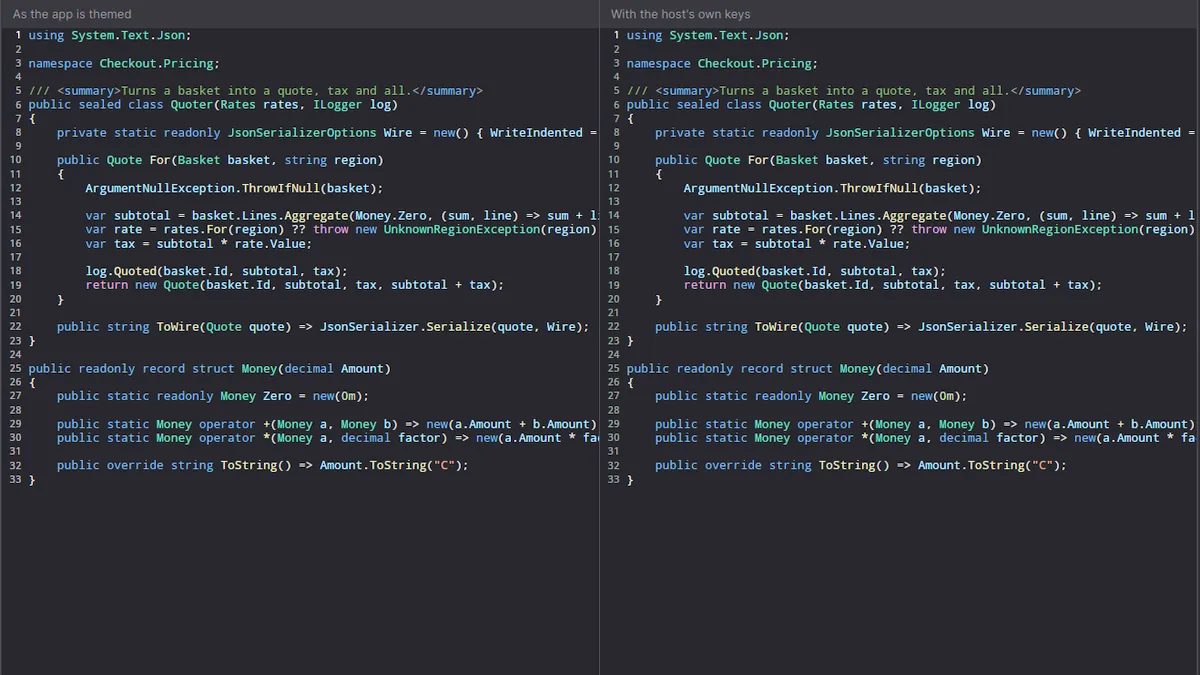
The control also follows your application's appearance, and a host that disagrees wins:
set AvaCodeEditor.SelectionBrush, AvaCodeEditor.CaretBrush or the
standard TextControlForeground on any parent, and Avalonia's resource lookup
does the rest.
Same control, same document: the app's palette on the left, a host's own keys on the right.
Solves: colouring a document while it is being typed into, without
re-reading it. A line is tokenized with the state the previous line ended in; if a
re-tokenized line ends in the same state as before, everything below it is still correct
and the work stops there.
Type
What it is
ILineTokenizer
InitialState, TokenizeLine(line, previousState, timeout), and an optional Warmup() that compiles a grammar off the render path.
ITokenizerState
Opaque "where the grammar was at the end of this line" — e.g. inside a block comment. Must have value equality: that equality is what stops re-tokenization.
LineTokenization(tokens, endState)
The result. TimedOut says these are a fallback, not the line's real answer — do not cache it as final.
HighlightToken(Start, Length, Scopes)
One run inside one line, in character offsets, carrying the scope chain.
ITextSource
Lines by index — a tiny interface of its own, so highlighting never depends on the control.
Solves: keeping a whole document's tokens current, incrementally
and on a budget. The editor uses one internally; you need it only if you are highlighting
outside the control — a minimap, a printout, a search preview.
var highlighter = new DocumentHighlighter(source, tokenizer) { MaxTokenizedLineLength = 20_000 };
highlighter.Warmup();                                  // compile the grammar off the render path
highlighter.Tokenize(throughLine: 200, TimeSpan.FromMilliseconds(4));
IReadOnlyList<HighlightToken>? tokens = highlighter.GetTokens(120);   // null: not reached yet
Member
What it does
Tokenize(throughLine, budget)
Bring lines up to date, spending at most budget. True when the range is current.
GetTokens(line)
Tokens, or null if that line has not been reached. Treat spans as advisory and clamp them — a line can be shorter now than when it was tokenized.
ApplyChange(start, removed, added)
Mirror an edit, so the cache follows the lines that moved.
HasPendingWork, DirtyFrom
Is there work left, and from which line.
Reset()
New document, or new grammar.
MaxTokenizedLineLength
Lines longer than this are left plain — a minified bundle must not stall the editor on one line.
Recipes
Four applications, built out of the pieces above. None of them needed a feature in the
control: each is a different set of providers plugged into the same editor.
A merge tool
Wants: two panes side by side, coloured by what differs, with
buttons that push a change from one side to the other — and one undo history across both.
foreach (var pane in new[] { left, right })
{
    pane.LineBackgrounds    = new DiffBands(model, pane.Side);    // added / removed / conflict
    pane.SegmentBackgrounds = new WordDiff(model, pane.Side);     // what changed inside a line
    pane.Margins.Add(new LineNumberMargin());
    pane.Margins.Add(new ChangeActionMargin { Provider = new Push(model, pane.Side) });

    // The application owns the history, so both panes undo as one document.
    pane.IsUndoEnabled = false;
}

// Scroll them together: Offset is an ordinary property.
left.PropertyChanged += (_, e) => { if (e.Property.Name == "Offset") right.Offset = left.Offset; };
The editor still knows nothing about diffs. It is drawing brushes it was handed, and
invoking callbacks it was given.
A debugger
Wants: red dots you can click, a yellow band on the statement about
to run, and the file staying editable when the program is not.
editor.Margins.Add(new BreakpointMargin(session));   // your own — a set of lines, a red dot, a click
editor.Margins.Add(new LineNumberMargin());
editor.LineBackgrounds = new CurrentStatement(session);

session.Stopped += (_, at) =>
{
    editor.MoveCaret(new TextPosition(at.Line, 0), extend: false);
    editor.BringCaretIntoView();
    editor.IsReadOnly = true;         // frozen while stopped; editable again on continue
};
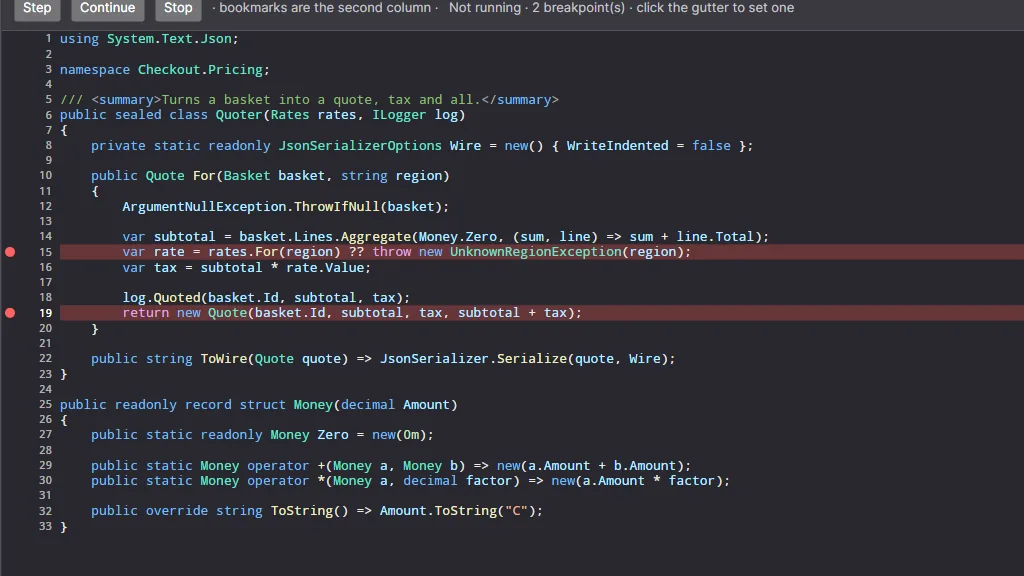
A gutter of your own, and one line background provider. That is the whole debugger view.
A log viewer
Wants: a two-gigabyte file, opened now, coloured by severity, and
impossible to type into.
editor.Buffer = new LogFile(path);        // ITextBuffer only — GetLine reads from an index
editor.IsReadOnly = true;                 // navigation, selection and copy still work
editor.LineBackgrounds = new Severity();  // warn amber, error red
editor.Margins.Add(new LineNumberMargin());
Because ITextBuffer has no editing methods at all, this file cannot be
changed by a stray key handler — the type says so, not a flag.
A blame view
Wants: who last touched each line, fetched in the background,
appearing without moving anything.
var blame = new Blame();
editor.Margins.Add(new LineAnnotationMargin { Provider = blame });

_ = Task.Run(async () =>
{
    var commits = await git.BlameAsync(path);   // slow, off the UI thread
    blame.Publish(commits);                     // raises AnnotationsChanged; the editor marshals
});
Until it lands the column is empty and takes no width — so the code does not shift
sideways when the blame arrives, and does not sit behind an empty strip while it loads.
Every type at a glance
Type
Namespace
Solves
CodeEditor
AvaCodeEditor
The control itself.
ColumnSelection
AvaCodeEditor
A rectangular selection, in grid cells.
PopoverRequestedEventArgs
AvaCodeEditor
Everything under a right-click: position, word, selection, scopes, cell.
PopoverTrigger
AvaCodeEditor
What asked for the popover.
ITextBuffer
…Document
A document the editor can show without owning it.
IEditableTextBuffer
…Document
…and can change.
IUndoableTextBuffer
…Document
…and can undo.
TextBuffer
…Document
The in-memory document, with history and exact line endings.
TextLine, LineTerminator
…Document
A line with its exact ending — the unit undo restores.
TextChange, TextChangedEventArgs
…Document
Which lines went, which arrived.
TextPosition, TextSelection
…Document
Where something is; what is selected.
CaretNavigation
…Editing
Where a key would put the caret — as pure functions.
DocumentEditor
…Editing
Character-level edits over a line-based buffer.
EditorMetrics, EditorViewport
…Rendering
The cell, and the slice on screen.
GridColumns
…Rendering
Character offset ⇄ visual column, tabs and clusters included.
LineLayout, EditorRow, RowKind
…Rendering
The map between screen rows and document lines.
TypefaceMetrics, TokenBrushes, RunStyle
…Rendering
Measuring the grid; turning theme colours into shared brushes.
IEditorMargin, MarginContext
…Margins
A gutter column, and everything it needs for a frame.
LineNumberMargin
…Margins
Line numbers that never jitter.
FoldingMargin
…Margins
The chevron column.
LineAnnotationMargin
…Margins
The blame column.
ChangeActionMargin
…Margins
The button column.
MarginFailedEventArgs, MarginBrushes
…Margins
A gutter that threw; the editor's ink at an opacity.
IFoldingProvider, FoldRegion, IFoldingView
…Folding
Where regions are, and what is closed.
ICodeLensProvider, CodeLensItem
…Lenses
The row above a declaration.
ILineAnnotationProvider, LineAnnotation
…Annotations
Per-line metadata, arriving late.
IChangeActionProvider, ChangeAction
…Actions
Buttons anchored to a block of lines.
ILineBackgroundProvider
…Decorations
A brush behind a whole line.
ISegmentBackgroundProvider, TextSegment
…Decorations
Brushes behind runs inside a line.
ILanguageDefinition, ILanguageRegistry
…Highlighting
A language, and the open set of them.
TextMateLanguageRegistry, TextMateLanguage
…Highlighting.TextMate
Bundled grammars, plus any dropped in a folder.
TextMateTokenizer, TextMateHighlightTheme
…Highlighting.TextMate
Grammar and VS Code theme, wired up.
LanguageLoadFailure
…Highlighting.TextMate
Why a grammar did not load — reported, not guessed at.
IHighlightTheme, TokenStyle, FontStyleFlags
…Highlighting.Theming
Scope chain → colour and emphasis.
ILineTokenizer, ITokenizerState, LineTokenization
…Highlighting.Tokenization
Incremental, line-by-line tokenization.
HighlightToken, ITextSource
…Highlighting.Tokenization
One coloured run; the document as the highlighter sees it.
DocumentHighlighter
…Highlighting.Tokenization
Keeping a document's tokens current, on a budget.
Packages and versions
Package
Contains
AvaCodeEditor
The control, the document model, the gutters, folding, CodeLens, multi-caret, popovers.
AvaCodeEditor.Highlighting
Tokenization, the language registry, themes, and the TextMate implementation. UI-framework independent.
The major version tracks Avalonia's. AvaCodeEditor 12.x.y is built for Avalonia 12
on .NET 10; when Avalonia 13 arrives, so does AvaCodeEditor 13.
The control is closed source and free of charge — the licence travels inside the package.
The demo
application is published in full: every screenshot on this page is one of its twelve
scenarios, and each is a small file you can read.